AI for Parents: Custom Bedtime Stories, Activity Ideas & Answers to Tricky Questions
By  Jatin Bhagat · 27 July 2026
No tech skills needed. Just your phone, a few minutes, and the prompts below.
Your child asks “why is the sky blue” mid-dinner. Or it’s 6 pm on a Sunday and you need an indoor activity that doesn’t involve a screen. Or you want tonight’s bedtime story to feature your daughter as the hero — not another princess from a book you’ve read forty times.
AI can help with all three, and the storybook takes one sentence and about a minute. This guide shows you exactly what to type, what to do when the first answer isn’t right, and where to draw the line.
But first — the experiment that convinced me this actually works.
The bedtime story that helped my son make a friend
As a Product Manager, my lens usually revolves around MVPs, experiments, and success metrics. Recently I found myself pointing that same lens at parenting.
My son is shy. New friends are hard for him. Instead of another lecture from me — which, let’s be honest, was going nowhere — I decided to run an experiment.
Using Gemini, I built him an illustrated storybook. He was the hero. The plot was simply: a boy learns how to walk up to someone new and say hello.

The very next day, he made a friend. 🙌
Here’s the storybook, built entirely with AI: Read it here →
One data point isn’t a trend, I know. But it unlocked something for me: a story stops being just a story when the child recognises himself in it. It becomes a rehearsal. That’s the idea behind everything below.
1. How to make a personalised illustrated storybook (1 minute)
Use Gemini. It’s the easiest by a mile, and it isn’t close. Gemini writes the story, draws every picture, and reads it aloud — all from one sentence you type. ChatGPT and Claude only write the words; you’d be hunting for pictures yourself.
So: you don’t need steps for this. You need a sentence.
Open gemini.google.com or the Gemini app, and type:
“Create a storybook about a shy 6-year-old boy who learns one simple way to say hello to someone new. Warm and gentle, happy ending, watercolour illustrations.”
Wait about a minute. Gemini hands you a finished 10-page book — written, illustrated, and narrated out loud.
That’s the whole thing. No settings, no setup, no account to configure beyond being signed in.
If you want to fiddle
Don’t like it? Reply in the same chat, like you’re talking to an illustrator: “Make it funnier.” “Change the style to claymation.” “Give him a little sister who helps him.” Gemini rebuilds the book with fresh artwork, and your old versions stay saved.
Want it on paper? Hit Share at the top for a public link, a printout, or a PDF. A printed copy on the bedside table hits differently than a screen.
Best trick: upload your child’s own drawing and ask Gemini to build the story around it. Their scribble becomes a real book. (Their drawing is also a safer thing to upload than their face.)
One catch worth knowing: Storybook is for account holders aged 18 and over, so the parent makes it, not the child. Which is the right way round anyway.
If you’d rather use ChatGPT or Claude (more work)
You get words only, no pictures — but they write a lovely story, and you’re the one reading it aloud anyway:
“Write a short bedtime story for a 5-year-old who loves elephants and is a little scared of the dark. Brave and kind main character. 300 words, simple language, happy ending.”
Then shape it by replying: “Make it shorter.” “Use simpler words.” “Remove the storm scene, it might scare her.” “Set it in a village near the Ganga during Diwali.”
Whichever tool you use, the ritual is the same: read it aloud together, then ask your child what should happen next time — and feed their ideas back in tomorrow.
💡 On your child’s details: a nickname or “a curious girl who loves cricket” works as well as a real name and keeps their identity out of it.
2. How to get activity ideas for any mood or moment (5 minutes)
Rainy afternoon. Long train journey. Toddler bouncing off the walls twenty minutes before dinner. This is where AI earns its keep.
Step 1. Give it your real constraints. This is the whole trick — vague question, vague answer.
“Give me 5 quiet indoor activities for a 4-year-old, we’re stuck inside on a rainy afternoon, using only things from an Indian kitchen, no screens, ready in under 10 minutes.”
Step 2. Ask for sibling variations:
“Make one of these harder so my 7-year-old can join in too.”
Step 3. Ask it to slow down if an instruction is unclear:
“Explain step 3 like I’ve never done this before.”
Step 4. Save the winners in your notes app. Over a few weeks you’ll build your own activity bank and stop asking from scratch every time.
3. How to answer a tricky question your child asked (2 minutes)
Kids ask hard things. About death. About money. About where babies come from, or why someone in the family is unwell. You don’t need a perfect answer ready — you need the right words, fast.
Step 1. Type the actual question, plus your child’s age:
“My 6-year-old asked why grandpa died. How do I explain this simply and honestly, without making her scared of death?”
Step 2. Ask for the tone you want:
“Keep it warm, short, and okay to say out loud tonight.”
Step 3. Push back if it’s off:
“That’s too long. Give me two sentences I can actually say.”
Step 4. Practise it once in your head — then go answer your child in your own voice. The AI is a rehearsal partner, not a script to read from.
The prompt formula behind all three
You don’t need to learn “prompt engineering.” Talk to it like a thoughtful friend who’s happy to try again.
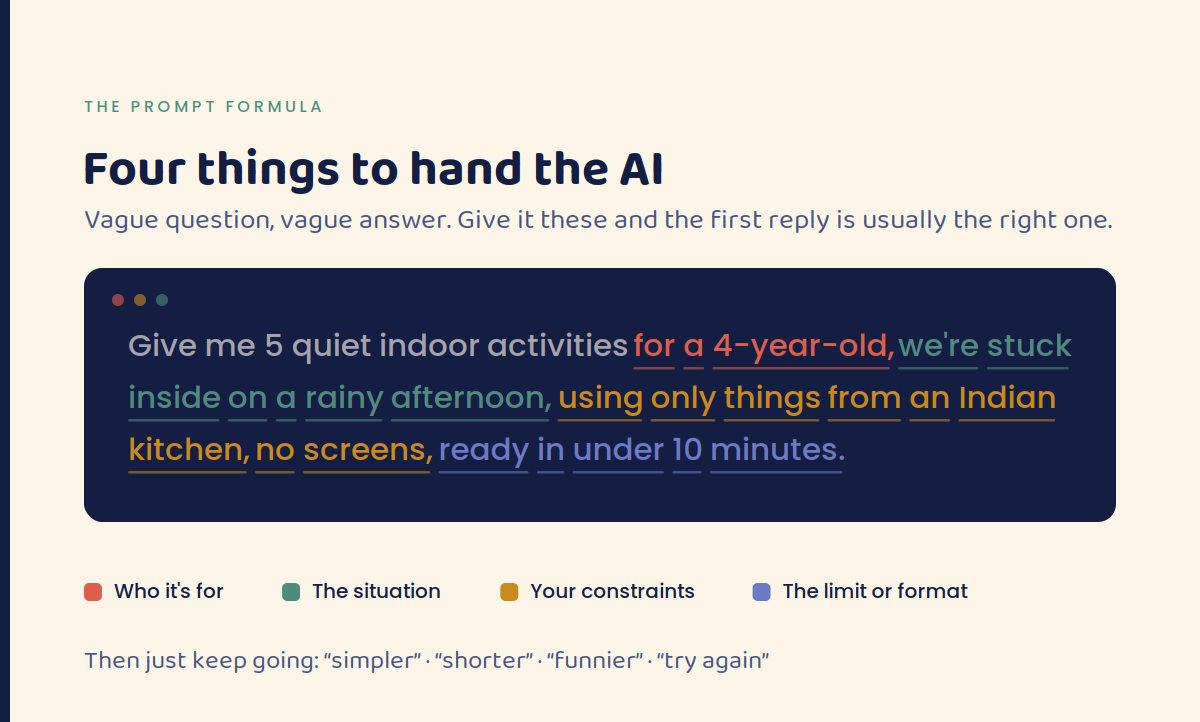
Then just keep going: “simpler,” “shorter,” “try again,” “make it funnier.” There’s no wrong way to phrase it and no limit on follow-ups. The second or third answer is almost always the good one.
Keeping it safe: 3 rules I don’t break
- Always read it first. Treat every AI story or answer as a first draft, not a finished product. You’re the editor. Gemini also has a Report content link at the bottom of every storybook cover if something comes out wrong.
- Go easy on identifying details. No full name, school, address, or health details. A nickname or “a 6-year-old” does the job. Think twice before uploading photos of your child’s face.
- AI supplements, it doesn’t replace you. Let AI handle the blank page. You handle the moment — the reading together, the playing together, the answering in your own voice.
FAQ
What is Gemini Storybook? A built-in Gemini feature that turns a one-line description into a roughly 10-page illustrated storybook with read-aloud narration, usually in one to two minutes. You can print it, save it as a PDF, or share a public link. It’s free to use and available in over 45 languages.
Which AI is best for parents — Gemini, ChatGPT, or Claude? For storybooks, Gemini wins outright because it illustrates and narrates. For activity ideas and explaining hard questions, all three are excellent — use whichever is already on your phone.
Is it safe to use AI for kids’ stories? Yes, as long as you read the output before sharing it and go light on personal details. Your child interacts with you, not with the AI. Note that Gemini Storybook is restricted to users aged 18 and over, so the parent is meant to be the one at the keyboard.
Do I need to pay for anything? No. Everything in this guide works on free tiers.
Can I print the storybook? Yes — Gemini’s Share menu includes Print, and choosing “Save as PDF” in your print options gives you a file. Some libraries and print shops will bind it into a real book.
How old should my child be for AI-generated stories? Any age, because you’re the one using the tool. Just match the reading level in your prompt: “for a 3-year-old, very simple words.”
Where this goes next
That storybook became our MVP. It cost me ten minutes and it did something a hundred lectures hadn’t.
What if every child had a storybook designed just for them?
Not to replace teachers, parents, or pedagogy — but to enhance growth journeys through hyper-personalisation, where learning feels fun, relevant, and genuinely about them.
We’re moving toward a world where education and parenting aren’t one-size-fits-all, but infinitely adaptable, personal, and human.
Tonight, try one prompt. Ten minutes. See what your child says.
Have you tried something like this with your own kids? I’d love to hear what worked.